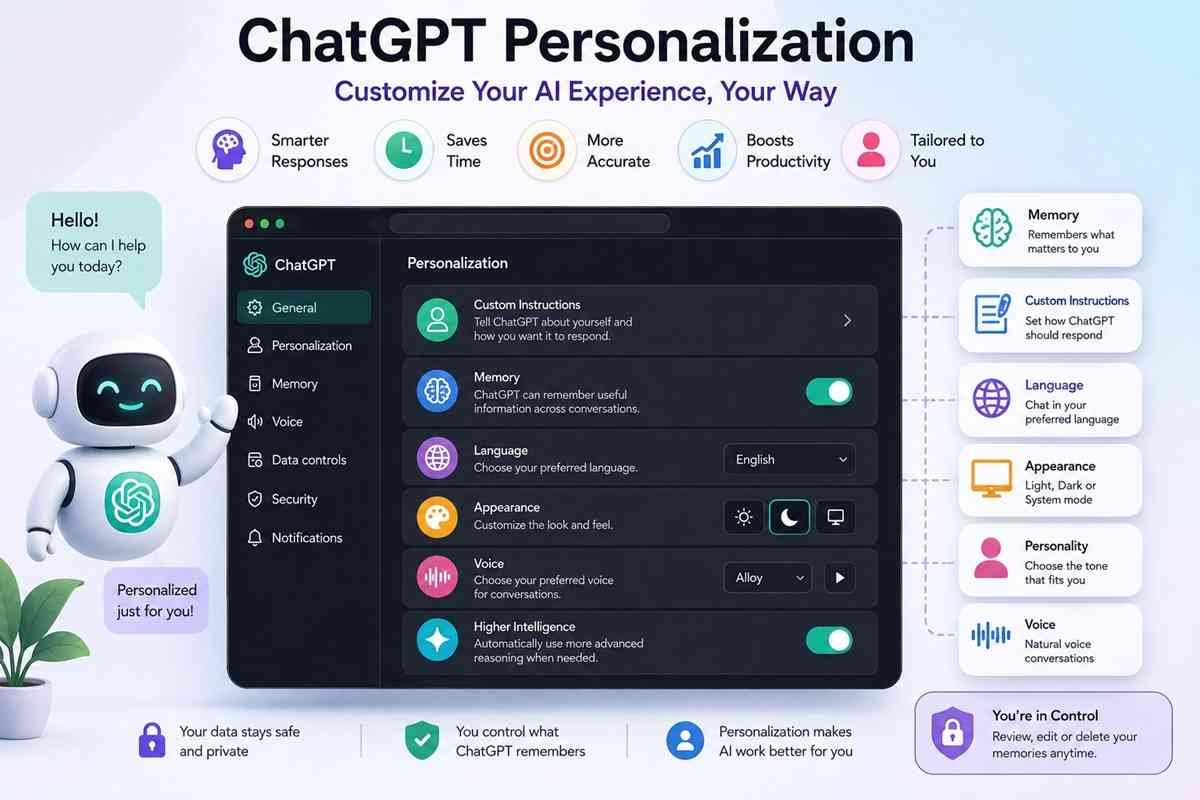
ChatGPT is no longer just an AI chatbot that gives the same responses to every user. With ChatGPT Personalization, you can customize how ChatGPT responds, remembers your preferences, and adapts to your writing style, profession, and daily tasks.
Whether you’re a student, marketer, developer, content writer, or business owner, personalization helps ChatGPT deliver more relevant, accurate, and consistent responses.
In this guide, you’ll learn everything about ChatGPT Personalization, including its features, settings, benefits, privacy options, and best practices.
| Feature | Details |
|---|---|
| Topic | ChatGPT Personalization |
| Purpose | Customize ChatGPT according to user preferences |
| Benefits | Better responses, saves time, improves productivity |
| Available Options | Memory, custom instructions, appearance, language, voice, personality |
| Best For | Students, professionals, businesses, developers, marketers, writers |
What Is ChatGPT Personalization?
ChatGPT Personalization is a collection of settings that lets you tailor your ChatGPT experience.
Instead of starting every conversation from scratch, ChatGPT can remember useful information such as:
- Your preferred writing style
- Favorite language
- Professional role
- Frequently used tone
- Interests
- Formatting preferences
- Previous saved preferences (when memory is enabled)
The goal is to provide responses that better match your needs without requiring repeated instructions.
Why ChatGPT Personalization Matters
Without personalization:
- You repeat the same prompts.
- ChatGPT starts with no context.
- Formatting changes every conversation.
With personalization:
- Responses become more consistent.
- Less time is spent writing prompts.
- Content quality improves.
- Workflows become faster.
Main Features of ChatGPT Personalization
1. Memory
Memory allows ChatGPT to remember information you ask it to save.
For example:
- Preferred writing style
- Job role
- Favorite programming language
- Business information
- Preferred response format
Example:
Instead of saying:
“Write in simple English.”
every conversation,
ChatGPT remembers your preference after you save it.
2. Custom Instructions
Custom Instructions allow users to define:
- Who they are
- How ChatGPT should respond
Example:
About Me
- SEO Specialist
- Digital Marketer
- Blogger
Response Preferences
- Use H2 and H3 headings
- Include tables
- Write SEO-friendly content
- Keep paragraphs short
This reduces repetitive prompting.
3. Language Preferences
Users can choose their preferred language.
Examples:
- English
- Hindi
- Spanish
- French
- Japanese
You can also switch languages during conversations.
4. Appearance
Appearance settings let users choose between:
- Light Mode
- Dark Mode
- System Default
Many users prefer Dark Mode during nighttime.
5. Accent Color
The interface includes accent color customization.
Different colors help personalize the ChatGPT interface while improving the visual experience.
6. Personality
ChatGPT offers different personality styles.
Depending on availability, users may choose styles focused on:
- Professional communication
- Creative writing
- Friendly conversations
- Technical explanations
The selected personality influences tone without changing factual accuracy.
7. Voice Settings
Voice conversations include customization options such as:
- Voice selection
- Speaking style
- Audio interaction
These settings create a more natural conversational experience.
8. Higher Intelligence Mode
Some accounts include a Higher Intelligence option that allows ChatGPT to automatically use more advanced reasoning when appropriate.
This can improve responses for:
- Complex coding
- Research
- Data analysis
- Long-form writing
- Strategic planning
Benefits of ChatGPT Personalization
Saves Time
No need to repeat the same instructions every day.
Better Accuracy
Responses align better with your preferences and work style.
Consistent Formatting
Ideal for:
- Blogs
- Reports
- Emails
- Academic writing
- Business documents
Improved Productivity
Professionals spend less time editing AI-generated content.
Better User Experience
Personalized conversations feel more natural and efficient.
How to Access ChatGPT Personalization
To customize your experience:
- Open ChatGPT.
- Click your profile icon.
- Open Settings.
- Navigate to the personalization-related options (such as Personalization, Memory, or Custom Instructions, depending on your account).
- Configure your preferred settings.
- Save your changes.
ChatGPT Personalization Settings Explained
Based on the current interface, users may see settings similar to the following.
| Setting | Purpose |
|---|---|
| Appearance | Choose Light, Dark, or System theme |
| Contrast | Improve interface visibility |
| Accent Color | Change interface highlight color |
| Language | Select preferred language |
| Higher Intelligence | Enable automatic advanced reasoning |
| Memory | Save useful preferences across chats |
| Voice | Customize voice conversations |
| Notifications | Manage alerts and updates |
Best Personalization Tips
For Content Writers
Ask ChatGPT to:
- Use SEO formatting
- Include FAQs
- Write human-friendly content
- Keep paragraphs short
- Add tables where useful
For Developers
Save preferences such as:
- Preferred programming language
- Coding style
- Documentation format
- Frameworks
For Students
Customize ChatGPT to:
- Explain concepts simply
- Provide examples
- Generate quizzes
- Summarize notes
For Business Owners
Personalize ChatGPT for:
- Marketing
- Emails
- Customer support
- Product descriptions
- Reports
Privacy and Personalization
Personalization is designed to improve your experience, but you remain in control.
You can:
- View saved memories
- Edit memories
- Delete memories
- Turn memory on or off
- Update custom instructions at any time
Review your settings periodically to ensure they reflect your current preferences.
Common Use Cases
Digital Marketing
- SEO blogs
- Keyword research
- Meta descriptions
- Content strategy
Software Development
- Debugging
- Code explanations
- API documentation
Education
- Homework help
- Study notes
- Practice questions
Business
- Email drafting
- Proposal writing
- Meeting summaries
Creative Writing
- Stories
- Scripts
- Poetry
- Social media content
Common Mistakes to Avoid
- Saving temporary information as permanent preferences.
- Assuming personalization guarantees perfect accuracy.
- Forgetting to update outdated preferences.
- Ignoring privacy settings.
- Relying solely on memory for important details without reviewing responses.
Is ChatGPT Personalization Worth Using?
Yes. If you use ChatGPT regularly, personalization can significantly improve efficiency by reducing repetitive prompts and making responses more consistent with your needs.
Casual users may notice small improvements, while professionals who use ChatGPT daily often benefit the most.
FAQs
What is ChatGPT Personalization?
ChatGPT Personalization allows users to customize settings such as memory, language, appearance, and response preferences to create a more tailored AI experience.
Can I turn off personalization?
Yes. You can disable features such as Memory or update your personalization settings whenever you choose.
Does ChatGPT remember every conversation?
Not automatically. ChatGPT only retains information according to your enabled settings, such as Memory, and you remain in control of what is saved.
Can I delete saved memories?
Yes. You can review, edit, or remove saved memories from the Memory settings.
Does personalization improve response quality?
It can improve relevance and consistency by tailoring responses to your saved preferences and communication style.
Conclusion
ChatGPT Personalization transforms ChatGPT into a more tailored assistant by adapting to your preferences, workflow, and communication style. Features like Memory, Custom Instructions, Appearance, Language, Voice, and Personality help reduce repetitive prompts and create a smoother experience.
Whether you’re writing content, developing software, studying, or managing a business, taking a few minutes to personalize ChatGPT can make your interactions more efficient and productive over time.

Related Posts

One thought on “ChatGPT Personalization: Complete Guide to Features, Settings & Benefits”